The workforce app built for mining and industrial teams
Give employees, contractors and visitors one simple place to access communication, information, safety tools, forms, maps and workforce support.
From operational updates and new-starter information to journey management, emergency support, village services and wellbeing resources, Co Connect brings everyday workforce needs into one mobile-first platform designed for remote and low-comms environments.
Co Connect is Australian-owned, female-founded and built from direct experience across mining, HR, health and safety, emergency response and FIFO operations.
One place for everything a worker needs
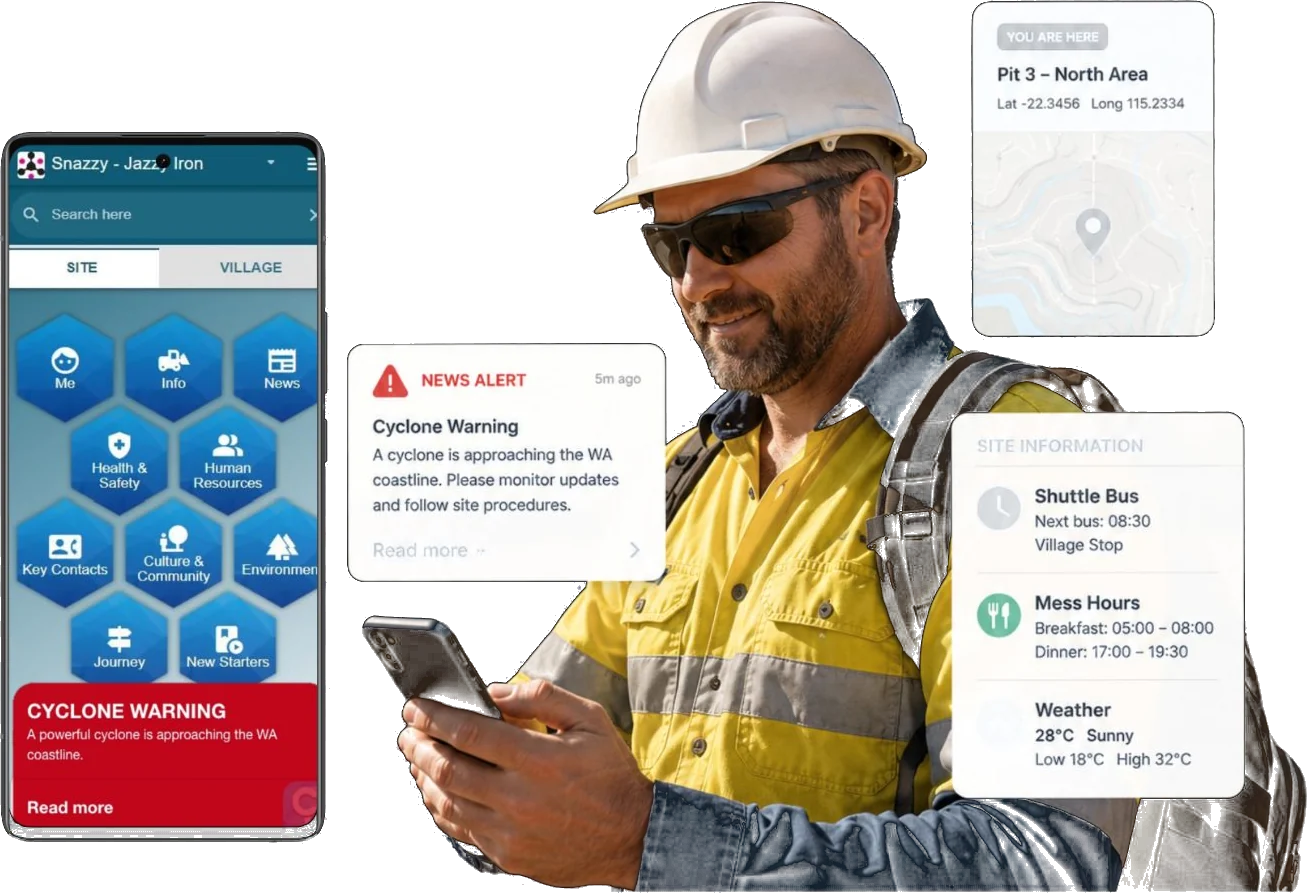
Co Connect Workforce App is a mobile-first platform that gives employees, contractors and visitors one place to access communication, operational information, safety tools, forms, maps, journey management and workforce support. It is designed for mining and industrial workforces operating across remote sites, FIFO villages, multiple companies and low-connectivity environments.
The result is simpler access for workers and clearer communication, administration and safety support for HR, HSE and operations teams.
Critical information should not be hard to find
Frontline workers are rarely sitting at a desk waiting for an email.
They move between work areas, companies, rosters, villages and remote locations. Contractors may arrive without access to internal systems. Important information may be split across emails, shared drives, noticeboards, paper forms and separate apps.
Co Connect gives the workforce one familiar starting point for everyday information and safety-critical support.
A better-connected workforce
Communicate through the app, push notifications, SMS, WhatsApp and email pathways rather than relying on one channel.
This improves coverage across employees, contractors, visitors, FIFO workers and teams without regular access to a company inbox.
Bring HR information, safety resources, procedures, contacts, transport details, maps, village services and operational updates into one searchable location.
Workers spend less time chasing information. HR, HSE and operations teams spend less time answering repeated questions.
Give workers direct access to emergency contacts, safety information, journey tools, duress support, medical guidance and location-based information.
Critical resources are closer to the point of risk, rather than buried in folders or dependent on someone answering a phone.
Replace common paper processes with mobile forms for hazards, maintenance requests, checklists, surveys, feedback and grievance reporting.
Information reaches the responsible team faster and creates a clearer digital record.
Give contractors and temporary workers controlled access to the information relevant to their role, company and location.
Multi-site and multi-company access helps workers move between authorised operations without learning a different system every time.
Promote training, internal opportunities, wellbeing resources, sports, social events and feedback pathways in the same app workers use for operational information.
This makes engagement part of the everyday workforce experience, not another poster on a crib-room wall.
Everything in one connected app
Each capability is configured around the organisation, its sites and the needs of different workforce groups.
Reach frontline teams with communication designed for people who are moving between shifts, sites and work areas. Messages can be delivered through configured channels, helping organisations extend communication beyond the workers who regularly check email.
Create a structured information hub that reflects the organisation, operation and workforce. Each user can be shown content based on their authorised site, company, role or group.
Co Connect brings everyday workforce communication and safety support into the same worker-facing app.
Give workers a straightforward way to submit information from the field, village or work area. Forms, destinations and escalation workflows are configured around the organisation’s operating requirements.
Help workers, contractors and visitors navigate complex and unfamiliar environments. Selected GIS information can be made available for low-connectivity and offline use, subject to the deployment configuration.
Workers can create a journey, complete a risk assessment, nominate Journey Contacts, check in, receive break or arrival prompts and activate SOS support during an active journey. Supervisors can approve journeys, monitor progress and respond to missed check-ins.
For FIFO villages, camps and shared facilities, the app can bring resident information and service requests into one place. This gives residents more control over everyday information while reducing repeated enquiries for facilities teams.
Use the platform to make workforce support and participation easier to access. Existing deployments have used the app to increase participation in health, wellbeing, sports and social activities, particularly among contractors and new starters.
The app supports existing emergency processes. It does not replace emergency procedures, trained personnel or an organisation's duty of care.
Built for every device and every level of digital confidence
Workers only see the sites, companies and information their organisation has authorised.
From configuration to everyday use
Co Connect sets up the organisation, sites, companies, branding, content areas, modules, user groups and access rules.
User information can be added through administrator uploads, approved data imports or scoped HR and database integrations.
Workers can receive an access message through SMS or WhatsApp and log in using their mobile number and token code.
The app displays information based on the worker’s authorised company, site, role or group. Workers with access to more than one operation can switch between approved views.
Workers can read updates, find contacts, access information, complete forms, use maps, view events and open safety or emergency tools.
Authorised administrators manage content, communications, users, forms, permissions and reporting through the connected Co Connect Portal.
One app, many roles
Access updates, procedures, contacts, forms, maps, emergency tools and support without needing to return to a desktop computer.
Receive controlled access to relevant information before or during the assignment, reducing the gap between permanent employees and temporary workforce groups.
Share onboarding information, policies, internal opportunities, wellbeing resources, surveys and support pathways through one consistent channel.
Make safety information, reporting forms, emergency instructions, HSR resources and journey tools easier to access at the point of work.
Improve consistency across sites, shifts and contractors while reducing reliance on informal communication and fragmented systems.
Publish resident information, services, events and transport details, and receive maintenance or facility requests through digital workflows.
Access dedicated module content, contacts, maps, procedures, training resources and communications without a separate workforce app.
Control content and access at company, region, site, group and role level through the Co Connect Portal.
Built for the conditions, not the ideal
Connectivity changes. Contractors move between companies. Workers share devices. Sites contain unfamiliar roads, buildings and facilities. Emergency information must remain practical when conventional systems are hard to reach.
The precise offline behaviour, localisation and access model are confirmed during deployment because not every function operates identically without connectivity.
The Workforce App is one part of the platform
Control users, communications, content libraries, forms, access permissions and reporting.
Manage the Workforce App through the PortalStructured journey planning, active-journey monitoring, check-ins and escalation for remote travel.
Explore Journey ManagementEmergency contacts, alerts, instructions, maps, medical guidance and urgent duress support.
View emergency response toolsInteractive maps connecting work areas, rooms, facilities, transport points and emergency locations.
See how GIS Wayfinding worksResident information, bookings, transport, maintenance requests and events.
Explore facilities supportHRM systems, SQL databases, data imports, email workflows and WhatsApp pathways following technical discovery.
Talk to us about integrationsA workforce app only creates value when people keep using it
Co Connect supports the deployment through a structured implementation process.
The team identifies the sites, workforce groups, modules, information, integrations and operational requirements that need to be supported.
Co Connect helps organise, simplify and upload workforce information, configure site and company access, create forms and establish the app structure.
User groups, permissions and approved integration or import pathways are configured and tested.
Administrators and key users receive training. App content, communications, forms, maps and access are verified before launch.
Launch support may include workforce information sessions, communication materials, onsite assistance and engagement activities designed to build awareness and uptake.
Client administrators manage ongoing information through the Portal, supported by the local Perth helpdesk, knowledge resources, usage reviews and content coaching.
The rollout schedule depends on the number of sites, content readiness, integrations, mapping requirements and workforce availability. Co Connect confirms timing after discovery rather than applying a one-size-fits-all deployment promise.
Deployed across 17 mine sites and two construction projects
These are outcomes from existing deployments and are not guarantees of future performance.
“The app and portal is easy to use and distribute notifications quickly.”
“This app bridges the gap between employees and contractors.”
Common questions
What is the Co Connect Workforce App?
Who can use the Workforce App?
How do workers log in?
Does Co Connect work without reliable internet coverage?
Can contractors switch between different sites or companies?
What information can be included in the app?
Does the Workforce App track workers all the time?
How is the Workforce App managed after launch?
How do you choose a workforce communication platform for low-connectivity areas?
Who should you hire to implement a digital safety and compliance system?
What is the best workforce app for mining workers?
Give every worker one place to start
Bring communication, information, forms, maps, safety tools and workforce support into one app designed for the realities of mining and industrial operations.
We will focus the session on your workforce structure, operating environment and priority use cases, not run you through a generic product tour.